Emacs Carnival: The Search for Knowledge
As part of the Emacs Carnival, Charlie Holland is hosting The Search for Knowledge:
This combines a couple of concepts that I think are near and dear to the hearts of many Emacsapiens, and have seen a recent surge in attention:
- Information Retrieval, or more abstractly "Search"
- Knowledge Management
Charlie lists eight ideas that participants might consider in their responses, and I've used them as my starting point.
Overview
I use Org-roam for work-related notes and denote for personal notes. This is a simple way to keep to the sets of notes distinct, and allows me to gradually notice similarities and differences between the two packages. They both provide everything I'm looking for in a knowledge management tool, and the only noticeable difference is that I have a nicer consult interface for roam (see the figure below). My work-related notes also overlap into task management, and I've explored using Org-roam to manage TODO items and agenda files.
My current workflow has arisen through two decades of tinkering, rewriting, and yet more tinkering with my Emacs configuration in general and with knowledge/task management workflows in particular. As I describe below, this system isn't perfect but it's good enough for me that I'm reluctant to introduce any major changes for now.
Knowledge graphs
I use my "knowledge graph" regularly each day, for work and for personal notes. But I've never used a graphical front-end to visualise the connections between my notes. Visualising the connections between my notes doesn't seem useful to me. Perhaps it's the nature of my research field, or how I conceive and perceive it, but the connections themselves don't reveal anything I didn't already know and choose to capture. I'm genuinely interested to read other blog posts in this carnival to see what people find useful about visualising their knowledge graphs.
Instead, I use a combination of folders and tags to categorise my notes, and use links to reference relevant notes. I use back links less frequently, and mostly when viewing a top-level "topic" note. My primary means of navigation is searching for notes by title, with the ability to narrow candidates by tags and folders, using a custom consult-org-roam wrapper.
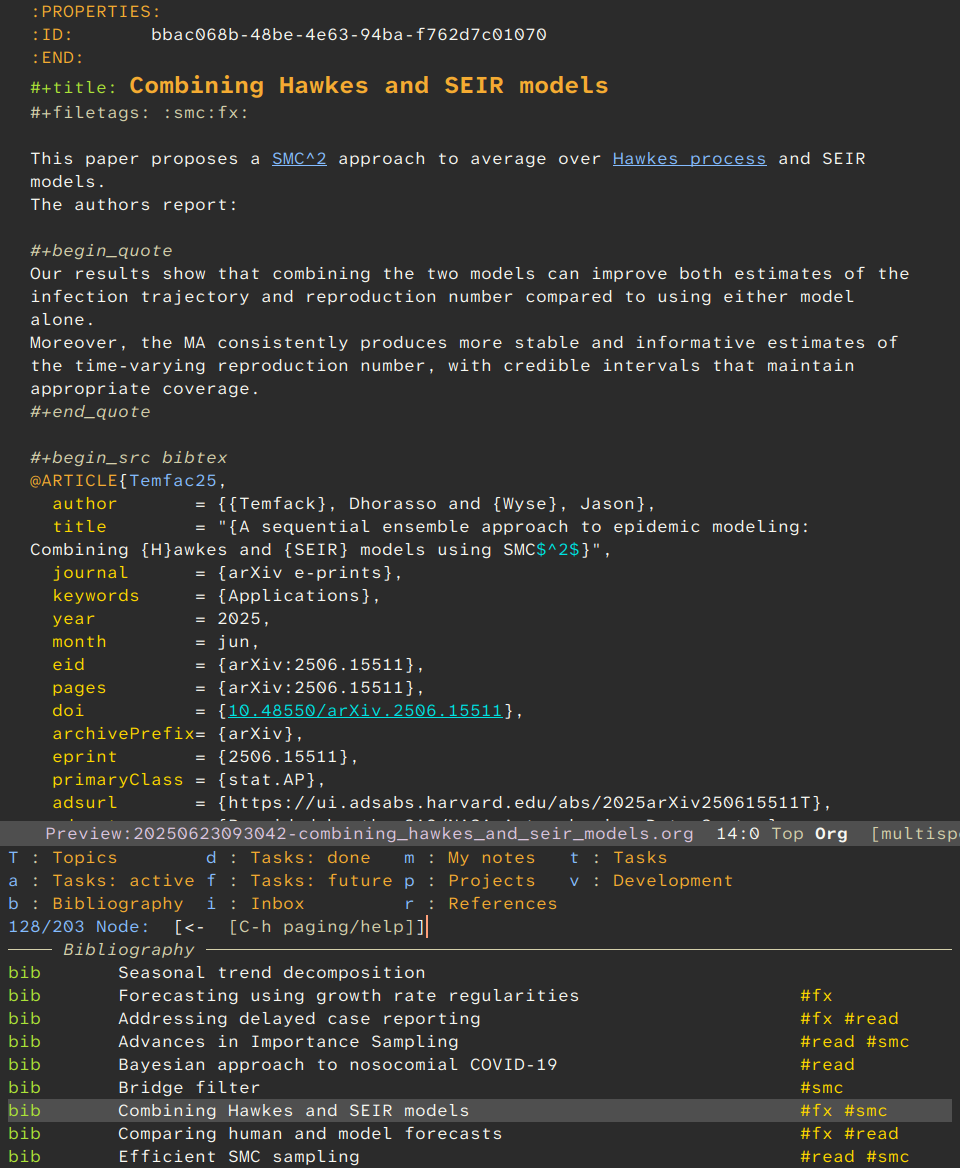
Figure 1: Searching my org-roam notes with my org-roam-boxes consult function.
The candidate list shows my bibliography notes (the bib box, left column) with tags (right column), and the candidate groups with their narrowing prefixes are visible above.
Each note is assigned to one or more groups (i.e., there can be overlap between groups).
I hide all projects, tasks, and topic notes by default, and use consult's narrowing feature to search within a specific group.
As shown in the figure above, I've customised org-roam-node-display-template to show the group name (left column), TODO states, note titles, and tags (right column).
Other useful things that I've implemented include:
-
An embark keymap for task notes that allows me to change TODO states, set deadlines/schedules, and clock into tasks.
-
Separate capture templates for each group, for top-level projects, and for my "inbox" of unsorted notes.
-
Custom functions to create specific types of notes, such as BibTeX references for anything with a valid DOI, arXiv ID, or other identifier.
-
I also use my custom consult-org-roam wrapper for inserting links to other notes (i.e., overriding
org-roam-node-select).
Writing articles
Literature notes are helpful when writing papers, but I don't construct a paper by merging or combining notes, rather the notes are useful references that help me sketch an outline and form the initial draft. They act as prompts and reminders, rather than as building blocks in any kind of literal sense.
Maybe this is why I don't find it useful to visualise the connections between my notes?
Searching vs linking
I have many small notes and relatively few long-form narrative notes. Each long-form note is typically associated with a specific project and acts as a catch all of timeline, history, meeting notes, random observations, and links to specific notes, all of which I can then easily search within the buffer. With this master file and long narrative notes for ongoing projects, I have a comfortable balance between lots of concise notes that I can locate quickly, and a small number of long notes where standard search commands can get me quickly to where I want to be.
I refer to papers typically by DOI links and embed BibTeX entries, and sometimes capture a PDF version of the paper. I tend to have quite short notes for each paper, and primarily link to them from longer notes about broader topics, themes, ideas, and projects. The paper note itself is often only the BibTeX citation, the abstract, and/or some relevant quotes - a reminder.
Inspired by Charles Choi's Casual project, I have considered designing a transient menu to encourage me to make more frequent use of my custom features, such as consulting TODO notes and projects. I currently assign these notes to groups that are hidden by default, and need to use consult's narrowing feature to display them. But for now I've settled on a single TODO file with 1-3 short sentences for each item, and use links to relevant notes and other files (e.g., manuscripts, reviews, and code) that aren't in my knowledge base.
Unsolved problems
I can't always find what I'm looking for. And I don't want to use a LLM to search my notes, so I need to do a better job of categorising, linking, and adding appropriate keywords to notes. But it isn't always easy. I know from many past experiences that I'm not great at anticipating how I might search for a specific note in the future.
A missing note
I couldn't find my note about presenting summaries of time series that avoid the issue of hiding temporal variation in features despite searching for ages, and only found it when a colleague reminded me of the paper title. I thought I'd noted and described it clearly at the time, but I couldn't find it by tag or even with a full-text search. And since I didn't add any links to existing notes, a graph visualisation would have only shown it as just another singleton.
Motivated by this "missing note" experience, I would like to explore different ways of searching my notes.
Multiple words/phrases can mean the same thing, and the same word/phrase can have different meanings. A "particle filter" might refer to a physical medium (e.g., air filtration) or to a Bayesian inference algorithm. Wikipedia addresses this with disambiguation (links to different topics with similar names) and redirection (links to the same topic with a different name), but the onus is on the author to define these links.
It would be great to somehow "discover" these links, instead.
Perhaps the closest feature that I've seen is GNU Hyperbole's implicit buttons, and the HyWikiWord implicit buttons in particular, which are extremely powerful (thanks Charlie!).
Perhaps disambiguation and redirection links could be implemented by implicit buttons that inspect links and backlinks to discover highly-connected subgroups of notes?
This would presumably involve natural language processing (e.g., with NLTK) for disambiguation and semantic similarity.
Maybe all of the necessary parts already exist and "just" need to be assembled?
Summary
Overall, I have a system that almost always works well enough for my needs, and I don't anticipate making any major changes unless I discover a truly pressing needris. This seems consistent with the advice commonly offered to people who are trying Org mode for the first time: don't try to build a "perfect" full-featured system straight away, start off gradually and make incremental changes as you begin to figure out what works for you. I think I'm close enough to a system that works for me for now ...